
Track Fundraiser Sales by Student: Guide & Free Template
Running a youth product fundraiser means tracking dozens of sellers at once. Your group might sell wreaths, popcorn tins, discount cards, or spirit wear. The product changes. The hard part does not. Somebody has to work out who sold what.
When paper order forms, Venmo screenshots, and cash envelopes pile up on the kitchen table, volunteer coordinators spend late nights copying data into a master spreadsheet. Miss one line and a seller loses credit, the inventory count drifts, and delivery day turns into a sorting party. That is why booster clubs and PTAs look for a way to track fundraiser sales by student that does not depend on retyping.
Treasurers have a second problem. Federal rules limit what a 501(c)(3) can do with the money once it is raised, and crediting proceeds to one family can put the group’s tax-exempt status at risk. Both problems share one fix: a record that shows who sold what, without promising any family a cut.
This is general information about nonprofit financial controls, not legal or tax advice. Check your bylaws, your parent organization’s handbook, or a tax professional before you set policy.
How do you track fundraiser sales by student across online and cash orders?
To track fundraiser sales by student, give every seller a unique link or code, log their cash collections against the same roster profile, and export one combined order list for delivery day.
Coordinators handle this one of three ways.
Method 1: Paper order forms and manual data entry
In traditional catalog sales, each student carries a paper order slip. When the sale closes, the coordinator collects the slips, tallies cash envelopes, and enters each line item into a central workbook.
This is where most attribution errors start. Raymond Panko’s end-user computing research at the University of Hawaii found cell error rates of 1.1% to 2.5% in audited real-world spreadsheets. In controlled experiments, 51% of spreadsheets contained at least one error, and most of those were only 25 to 50 cells in total size.
One finding is worth carrying into your own tracker: Panko reports that mistyping a number is actually rare, and that logic and omission errors dominate. A tidy-looking spreadsheet with a wrong VLOOKUP range fails silently. With 50 students selling across four product lines, a volunteer builds and maintains several hundred cells, and the errors that survive are the ones nobody can see.
Method 2: Main storefront with checkout seller dropdowns
Some organizations set up a single web form with a required text field or dropdown that asks, “Which student should get credit for this order?”
This captures online card orders, but it adds new problems:
- Spelling mistakes. A supporter types “Tommy” when the roster says “Thomas Smith,” so the lookup formula finds nothing.
- Skipped fields. An out-of-town grandparent leaves the box empty, or picks whoever sits first in the dropdown.
- Cash still lives somewhere else. Orders paid by cash or check never touch the form, so those get typed into a second tab anyway.
Method 3: Unique seller links
Some fundraising platforms give each student on the roster their own storefront link. A parent or student texts that link to family and friends. The buyer lands on the campaign storefront with the seller already attached to the cart.
At checkout, the platform tags the order to that roster member. Treasurers get a running ledger of unit counts and dollars per seller, without copying names or maintaining lookup formulas.
The tradeoff is setup. You need the roster loaded before the sale opens, and a plan for the cash and check orders that never touch a link at all.
Are Individual Student Accounts (ISAs) legal for 501(c)(3) booster clubs?
No, not in the form most boards have in mind. An Individual Student Account that credits fundraising proceeds dollar-for-dollar against a specific student’s fees, dues, or travel costs is private benefit, and a 501(c)(3) booster club that operates that way can lose its tax-exempt status.
It is a common assumption that whatever money a student raises belongs to that student’s family, to put toward choir trips, band uniforms, or club dues. Under federal tax law, crediting proceeds that way is private benefit: the organization is being run for the benefit of particular families instead of exclusively for its exempt purpose.
The IRS private benefit doctrine
To keep 501(c)(3) status under the Internal Revenue Code, an organization must operate exclusively for public, educational, or charitable purposes. The IRS inurement and private benefit rules bar a nonprofit from being operated for the benefit of private interests, and bar net earnings from inuring to insiders.
In Capital Gymnastics Booster Club, Inc. v. Commissioner (T.C. Memo. 2013-193), the U.S. Tax Court agreed the IRS could revoke the club’s exempt status. The club credited fundraising earnings to individual family accounts to offset athlete assessments. Families who fundraised paid less out of pocket. Families who did not fundraise paid full price. The court called that a private interest, not a charitable one.
That draws a narrow but clear line. Parent Booster USA, a national compliance organization for booster clubs, publishes guidance on the same distinction.
- What puts your exemption at risk: Allocating fundraising dollars into individual student accounts to reduce one family’s required fees, dues, or travel assessments based on how much that student sold.
- What is fine: Tracking individual sales to award non-cash prizes, hand out recognition patches or ribbons, monitor inventory checkouts, recognize top sellers, or build group leaderboards.
How to track individual Scout sales under Scouting America rules
Scouting units work differently, and the difference matters. When managing product sales for Scout troops, the national Scouting America fiscal policies place unit assets with an organization rather than with individual youth. Which organization depends on how the unit is registered. For charter organization units, assets generally belong to the charter organization. For council registered units, they belong to the council. For parents’ or citizens’ group units, they belong to the unit.
Within that structure, the same policy does allow Scout accounts. It says Scouts “can credit a reasonable amount of funds earned toward their Scouting expenses,” but “cannot use funds earned for any non-Scouting purposes and cannot take the money with them if they leave Scouting.” So tracking individual Scout sales for a popcorn campaign, and crediting a reasonable amount toward that Scout’s own Scouting expenses, is permitted. Treating the balance as the family’s money is not. Surplus unit funds go to the charter organization for charter organization units, and to the council for the other two categories.
That is more permissive than the booster club rule above, and there is a reason. The same policy states that “BSA policy prohibits units from incorporating or seeking tax exempt status,” so a typical unit is not itself a 501(c)(3). If your unit or booster club does hold its own 501(c)(3), the private benefit rules above govern instead.
How to build a fundraiser tracking spreadsheet by student
A good tracker keeps four things apart: who the seller is, how many units they moved, what they have paid in, and which prize tier they hit.
When building a tracker in Google Sheets or Microsoft Excel, set up your columns so the audit trail holds up:
| Section | Column Headers | Purpose & Formula Logic |
|---|---|---|
| 1. Member Directory | Student ID, Full Name, Grade/Subgroup, Parent Email | Unique primary key to prevent name collision errors |
| 2. Product Counts | Item A Qty, Item B Qty, Gross Items Sold | =SUM(Qty_Cells) per student row |
| 3. Financial Totals | Card Sales ($), Cash Collected ($), Total Due ($), Balance | =Total_Due - (Card_Sales + Cash_Collected) |
| 4. Incentive Tiers | Sales Level Met, Eligible Prize / Ribbon | =IF(Gross_Items>=50, "Tier 3", IF(Gross_Items>=25, "Tier 2", "Tier 1")) |
Formulas do not stop miscounts. They surface them. When total due stops matching card sales plus cash collected, the balance column shows it before the money reaches the bank. Our fundraiser cash reconciliation guide covers the deposit side.
If your group runs money through a California school’s associated student body account, FCMAT’s ASB Accounting Manual is one state agency’s internal-control standard for this kind of recordkeeping. It is written for school-district ASB funds rather than independent booster clubs, but the controls travel well.
How seller links credit an order and build the delivery-day list
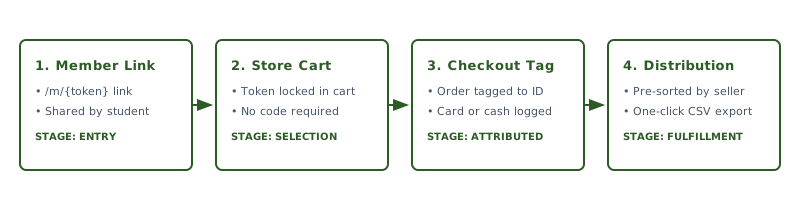
Seller links replace manual data entry with four stages that connect the online storefront to your delivery roster.
Stage 1: Link distribution
Each student on your roster gets a unique link. Students and parents share it by text, email, or social media with family, friends, and neighbors.
Stage 2: Cart session tagging
When a customer clicks the link, the storefront loads like normal, and the cart is already holding that seller’s token. The customer picks product variants and pickup windows and checks out. There is no promo code to remember and no name to choose from a list.
Stage 3: Order tagging, and what happens without a link
At checkout, the order record is tagged to the seller’s roster profile. If a supporter buys from the main storefront without a link, or pays with cash or a check, the treasurer assigns that order to a member from the admin dashboard.
Stage 4: Delivery list generation
When sales close, the treasurer exports a distribution CSV, pre-sorted. Instead of cross-referencing paper slips by hand, volunteers get an itemized roster list showing exactly what each student has to deliver.
Moving from paper slips to a roster-aware ledger
Switching to seller links removes the retyping step and keeps one auditable record of every cash and card order.
Spreadsheets hold up fine for a group of ten sellers. At 50 or 100 students across several products, they stop holding up. Lost slips, cash counts that do not match, and names spelled three different ways all land on the same volunteer, and then in front of the board.
UnitTally includes seller link attribution on every plan. Each seller on your roster gets a unique link (/m/{token}) that credits online product purchases to their name at checkout. Online card orders settle into your organization’s own Stripe account and carry Stripe’s processing fee plus a capped UnitTally platform fee, listed as two separate line items. Our post on what zero-fee fundraising actually means breaks down that split.
For offline orders, there is a roster-aware manual ledger. Log cash and check payments against a member profile with no UnitTally platform fee and no payment processor to set up. On delivery day, export the whole campaign as a CSV sorted by student or by product. The fundraiser fee calculator shows what a card order costs.
Download the free student fundraiser sales tracker template
Our free fundraiser tracking spreadsheet by student works in both Google Sheets and Excel. It totals product counts per seller and flags incentive tiers, so nobody has to write the formulas.
Free download: Youth Fundraiser Roster & Sales Tracker
Enter your email to join the early access waitlist and get instant access to the template file.
Start your next fundraiser
Join the waitlist. Launch your next wreath, cookie, or spirit wear sale with capped per-transaction fees.